

API Reference
Gemini Live service documentation
Pipecat CLI
Scaffold and deploy projects
Capabilities
Pipecat’s Gemini Live integration supports multiple modalities and deployment targets:Voice
Real-time speech-to-speech conversations with natural turn-taking and voice
activity detection
Vision
Process video and screenshare alongside audio for multimodal interactions
Telephony
Build phone-based voice agents with Twilio WebSocket integration
Tool Use
Function calling support for external integrations and dynamic responses
Architecture
Pipecat manages connections between your client and Gemini Live: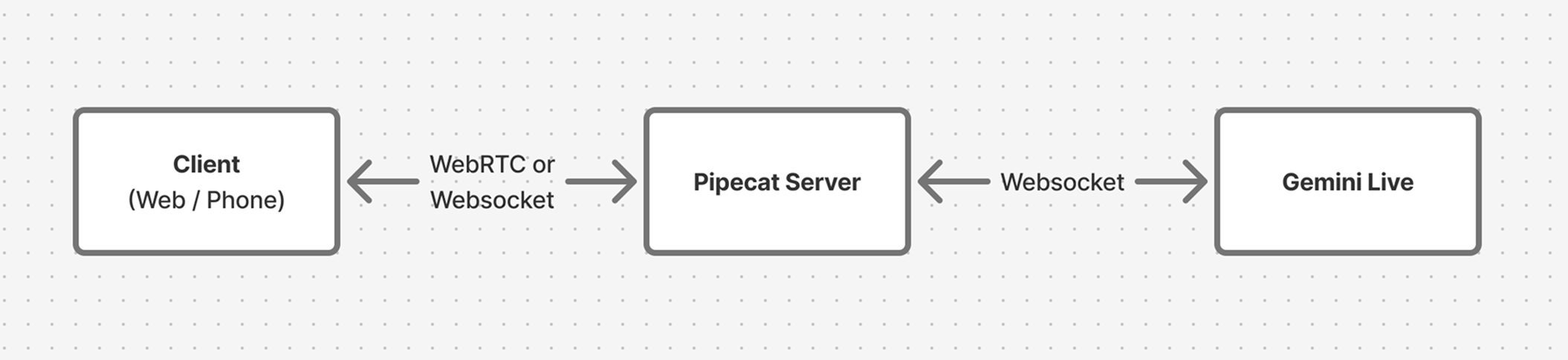
Quick Start
The fastest way to start building is with the Pipecat CLI:- Bot type: Gemini Live (speech-to-speech)
- Transport: Daily WebRTC, Twilio, or others
- Deployment target: Local development or Pipecat Cloud
Starter Projects
These complete examples demonstrate Gemini Live in production scenarios. Each includes local development setup and Pipecat Cloud deployment configuration.Phone Bot (Twilio)
A telephone-based voice agent using Gemini Live with Twilio WebSockets. The demo plays “Two Truths and a Lie” to showcase natural conversation flow.Phone Bot Starter
Build a production phone agent with Twilio integration
- Twilio WebSocket transport configuration
- Google STT/TTS integration alongside Gemini Live
- TwiML setup for incoming calls
- Pipecat Cloud deployment with telephony
Web Bot (Vision)
A browser-based agent with screensharing and vision capabilities, built with the Pipecat Voice UI Kit and Daily WebRTC transport.Web Bot Starter
Build a web agent with vision and screensharing
- Daily WebRTC transport for web clients
- Vision/screenshare processing with Gemini Live
- Next.js client with Voice UI Kit components
- Resizable panels and event logging
Deployment
Both starter projects include configuration for Pipecat Cloud, which handles scaling, monitoring, and global deployment.pcc-deploy.toml file with sensible defaults for agent configuration and scaling.
Pipecat Cloud Deployment
Learn more about deploying to production
Next Steps
Function Calling
Add external integrations and dynamic responses
React Client SDK
Build custom web interfaces
Telephony Guide
Deep dive into phone integrations
Core Concepts
Understand Pipecat pipelines and processors